
The setup
I spent a while poking at the piece of an agent harness that quietly does the most work: the agentic loop. Not the model, not the prompt. The loop that iterates between them, the one where the model asks for a tool, your code runs it, and the result goes back for another round.
I wanted to see how different runtimes handle that loop when a human sits inside it. So I built a small chat-style web app, gave it one deliberately awkward human-in-the-loop tool, and wired the same tool to six backends: two libraries you host in your own process, three hosted “managed” runtimes, and one hand-rolled control.
The result surprised me. The managed options did not turn out simpler. Here is the walk through.
The simplest chat
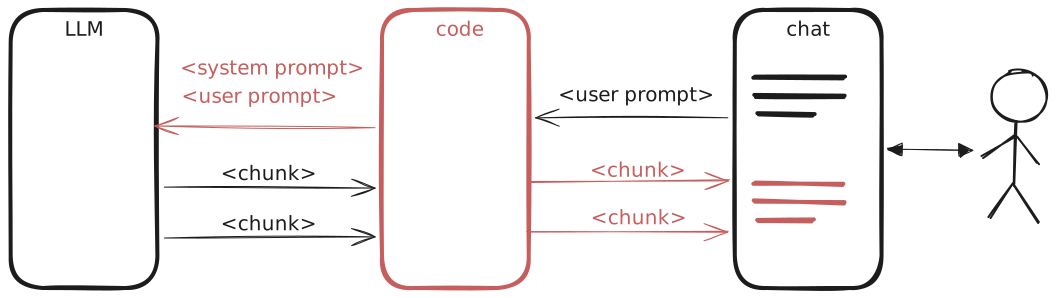
Three actors. The LLM. Your code. The chat the user sees.
One request goes in with the system prompt and the user message. Chunks stream back. Your code is plumbing: it forwards prompts one way and forwards chunks the other. No tools, no loop.
This is the floor. Everything else in this post is what you add on top of it.
Add tools, get a loop
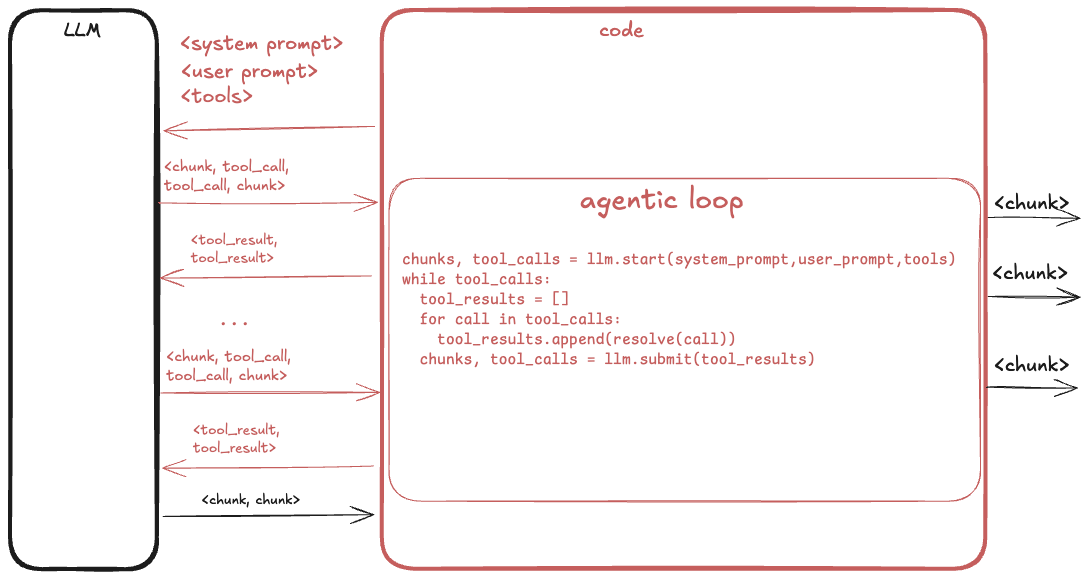
Now put tools in the first request. The model can respond with tool_calls instead of chunks. Your code resolves each call, sends the tool_results back, and the model gets another turn. It stops calling tools when it thinks the goal is done.
That is the agentic loop. It fits on a whiteboard. It also has one quiet property that catches everyone at least once: the loop is not guaranteed to terminate. Nothing in the protocol says the model will eventually stop asking for tools. Cap the loop with something you control - max steps, a wall-clock deadline, a token budget. Pick your poison, but pick one.
The piece that actually runs this loop is what I will call the runtime. It can be a library you import into your own process, or a hosted service that runs the loop on someone else’s machine and hands you back turns. That distinction is the whole rest of the post.
Three kinds of tools
Once tools exist you notice they are not one kind of thing:
- Generic tools.
web_search,code_interpreter,file_read. Broadly useful. If you use a hosted runtime the vendor tends to ship them - one of the real benefits. Roll your own loop and you may have to implement them yourself. - App-specific tools.
query_db,send_email. Wired into your domain, written by you. - Human-in-the-loop tools.
ask_user,plan. The model defers to a person.
Same wire protocol for all three. What differs is where the work happens. Generic tools are the kind of thing you would rather delegate than re-implement, which is why a hosted runtime that ships them is attractive. App tools are specific to your domain and usually need credentials for your own systems, so they stay on your side. HITL tools do not really “run” at all. They pause the loop until a human answers.
That last one is the interesting one. Every other kind of tool holds a quiet assumption that resolving a call is fast. HITL breaks that assumption. The loop can sit paused for seconds, minutes, or overnight while the user goes to make coffee.
Dispatching tools is not trivial
Say the model asks for delete_customer_record. Now what?
Two dimensions decide the answer.
Permission. Auto-execute? Ask the user first? Refuse? Real harnesses group these into modes: interactive, lenient, strict, sandboxed. Some let the model itself choose which to apply, per call.
Execution. Run it now and block? Run it in parallel with other tool calls? Run it in the background and stream progress back later? Read-only tools can run in parallel; anything stateful cannot. Some tools carry state across calls: an open shell, a file handle, a session.
Multiply the two dimensions and dispatch stops looking like a pattern and starts looking like a subsystem. So the question raises itself: build this yourself, or delegate to a runtime?
To answer that I needed a load-bearing test case.

The experimental “toy” tool: rock-paper-scissors
Here I have to be honest about the toy. The tool I picked is called play_rps_round (play_rock_paper_scissors_round). The frontend renders a widget with three buttons. The model commits its own throw first, then the widget waits for the human to click one. Whoever wins wins.
It is not a real feature. It is a probe. I picked it because it stresses the runtimes in a way a normal request/response tool cannot:
- Stateful. The agent commits its throw before the human replies. That committed choice has to survive.
- Interactive. The tool cannot return without a click. No sensible default value exists.
- Odd shape. It is nobody’s boilerplate. Each runtime has to expose its real HITL mechanism rather than paper over it.
That last property is what makes it useful. A more familiar tool like send_email can be faked with a mock. Rock-paper-scissors cannot. The runtime either supports real pause-and-resume, or it cheats visibly.
What must survive a browser reload
Say the user throws the model into a round of RPS, then closes the browser tab and goes to lunch. When they come back and reopen the chat, what should happen?
The right answer: the conversation resumes mid-flight. Same conversation id, same running goal, and the RPS widget is still waiting for the click that never happened.
That single sentence hides the whole HITL problem. Everything the loop was holding has to serialise: the conversation, the tool-call context, the agent’s committed throw. Whatever process might have been holding it in memory is long gone.
The bare minimum you keep locally can shrink to one string: a stable conversation id. The rest lives wherever the runtime keeps its state. Where that “wherever” is happens to be the fork in the road.
Choice A: keep the loop in your process (with a library)
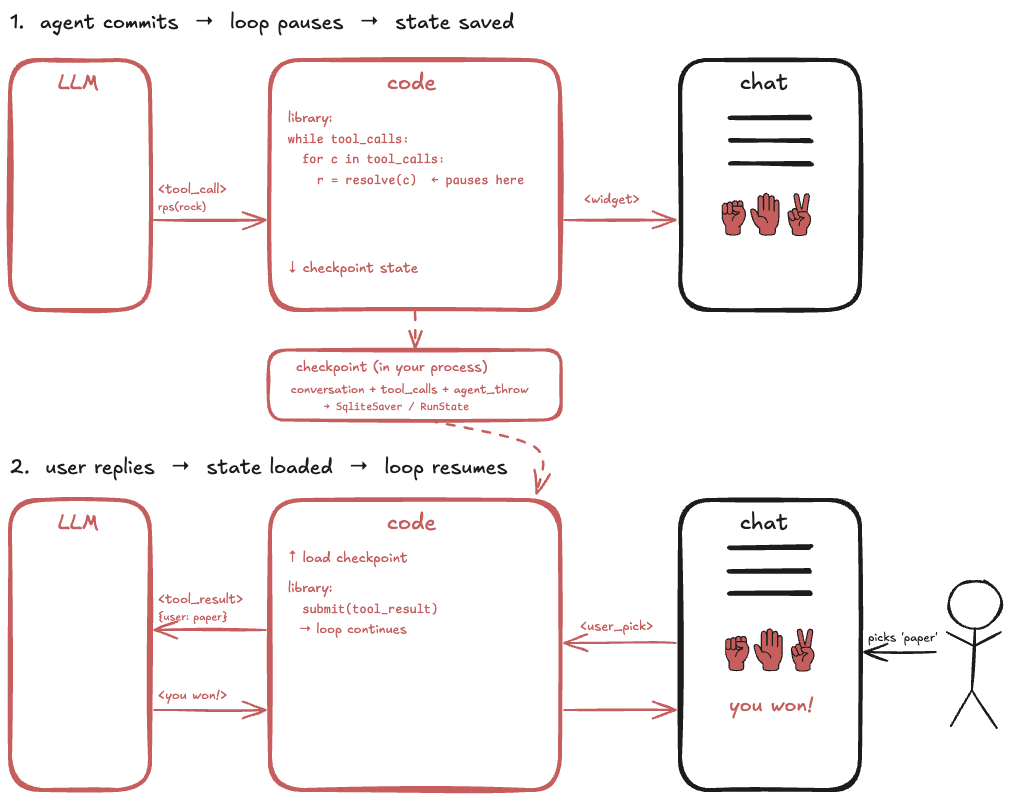
The two libraries I looked at:
- OpenAI Agents SDK - loop driven by
Runner.run(). - LangGraph - loop driven by
graph.invoke().
You import one of them. You still run the loop. But the library drives its shape.
Runner.run() or graph.invoke() iterates the LLM -> tool -> LLM steps for you. It also gives you a checkpoint object. LangGraph’s SqliteSaver writes it to disk for you. OpenAI’s RunState is serialisable but you persist it yourself. When the user comes back after lunch, you look up the checkpoint by conversation id and rehydrate.
What the library does not do: your tools. You still write the function that talks to the RPS widget, hands the pause off to the frontend, and picks up the human’s answer. HITL tools stay on your side of the line. So does any real permission logic, if you need it. Both libraries have basic hooks, neither has modes.
Between the two, the difference is who wires persistence. LangGraph’s SqliteSaver writes state to disk as the graph runs. OpenAI’s RunState can survive a restart just as well, but only if you write and reload it yourself.
Choice B: let the runtime own the loop
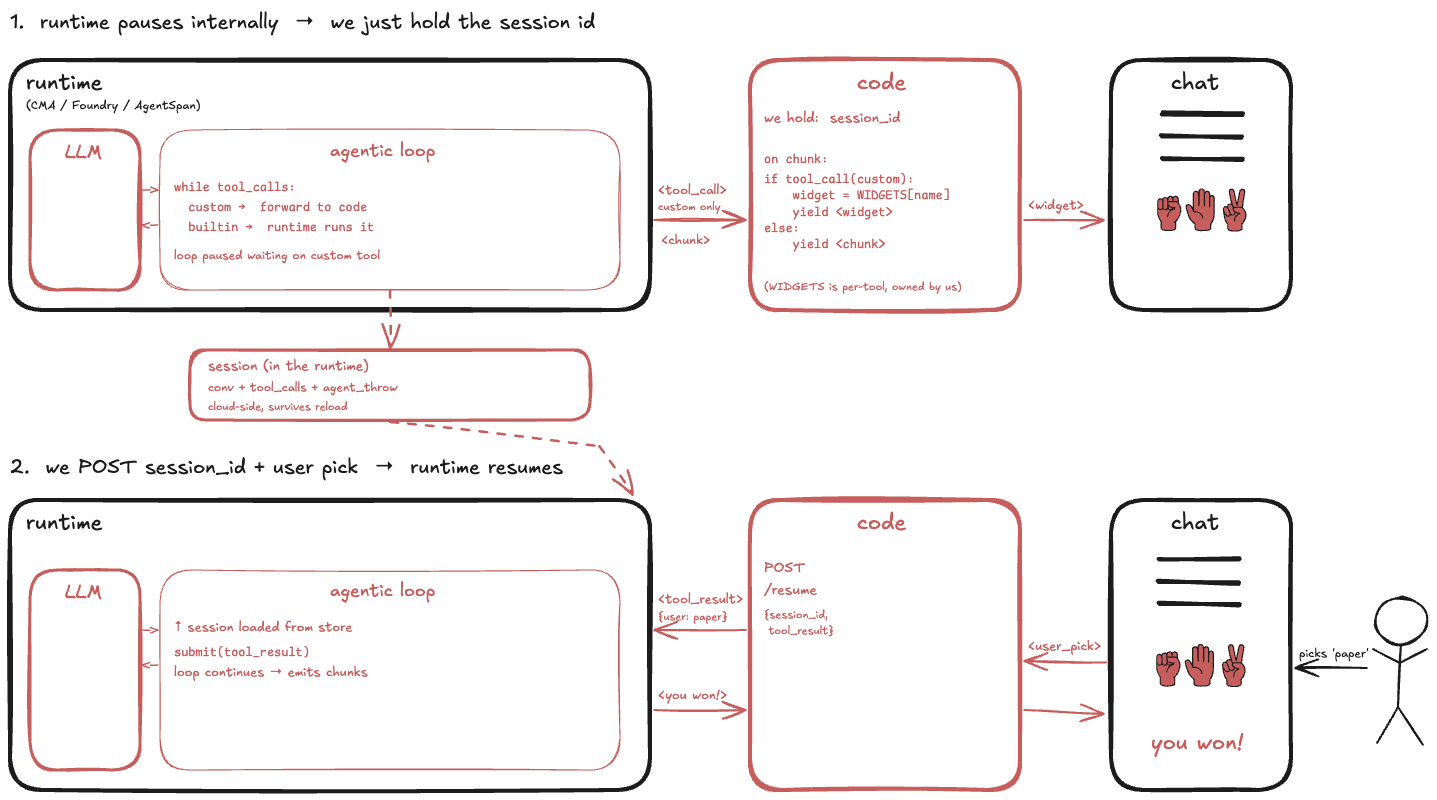
The three hosted runtimes I looked at:
- Claude Managed Agents (CMA) - Anthropic.
- Azure AI Foundry - Microsoft.
- AgentSpan - durable-execution runtime with approve/reject HITL.
Hand the loop to any of them and the loop runs on their side. Where the runtime ships generic tools like web_search, those run on their side too. Your local surface area shrinks to a session id and a wire between the browser and the runtime’s HTTP API.
I expected this to be simpler. It is not. It is different.
State does not vanish, it moves. And moving it into a hosted service tends to make it less accessible, not more.
Take Claude Managed Agents. The agent’s committed RPS throw is still there, but it is not a variable in your code anymore. It lives inside the conversation event stream on the server, and to read it back you walk the event history through the API. Simple to describe, more work to actually wire than “keep a dict in memory keyed by session id.”
AgentSpan is the sharper example. It has HITL as a first-class primitive: a tool marked @tool(approval_required=True) pauses durably, and someone calls approve() to resume it - hours or days later, from anywhere. What it does not have is a way for the human to hand a value back. approve() takes no payload. So the human’s RPS throw has nowhere to live in the SDK. It rides a side-channel: your code writes the throw into a shared store, calls the payload-less approve(), and the tool body reads the throw back out of the store to compute the winner. It works, but you can feel the extra plumbing.
Foundry sits between the two on this axis. HITL exists as a first-class idea, but the state you can inspect from your process is still less than what a library like LangGraph gives you.
None of this makes the managed options bad. They win convincingly on things like durability past a process restart and standard-tool coverage. “Hosted” just did not translate into “less code” the way I expected.
Where I landed
Two extremes. Neither is free.
Roll the loop yourself and you get maximum control, but you also inherit the entire dispatch subsystem: permissions, parallelism, background execution, HITL pause and resume, checkpoints, all of it. That is a lot of code that is not what your product is about.
Delegate to a managed runtime and you push a real chunk of that code off your machine. But state migrates with it. What used to be a variable you could inspect is now behind an API call. HITL support ranges from first-class to a boolean gate with a side-channel workaround. “Managed” is not the same as “simpler.”
The sweet spot for what I was building sits in the middle. A local library that owns the loop mechanics and the LLM API and the checkpoint storage, so I can keep the parts that are really mine - tool bodies, permission decisions, the shape of the UI - without owning the parts everyone else has already solved. LangGraph is closer to that spot than the other five. Not because it does more, but because it draws the line in the place I want.
If I picked up this project again next month, that is where I would start.
Comments